



 1
1Pick a color
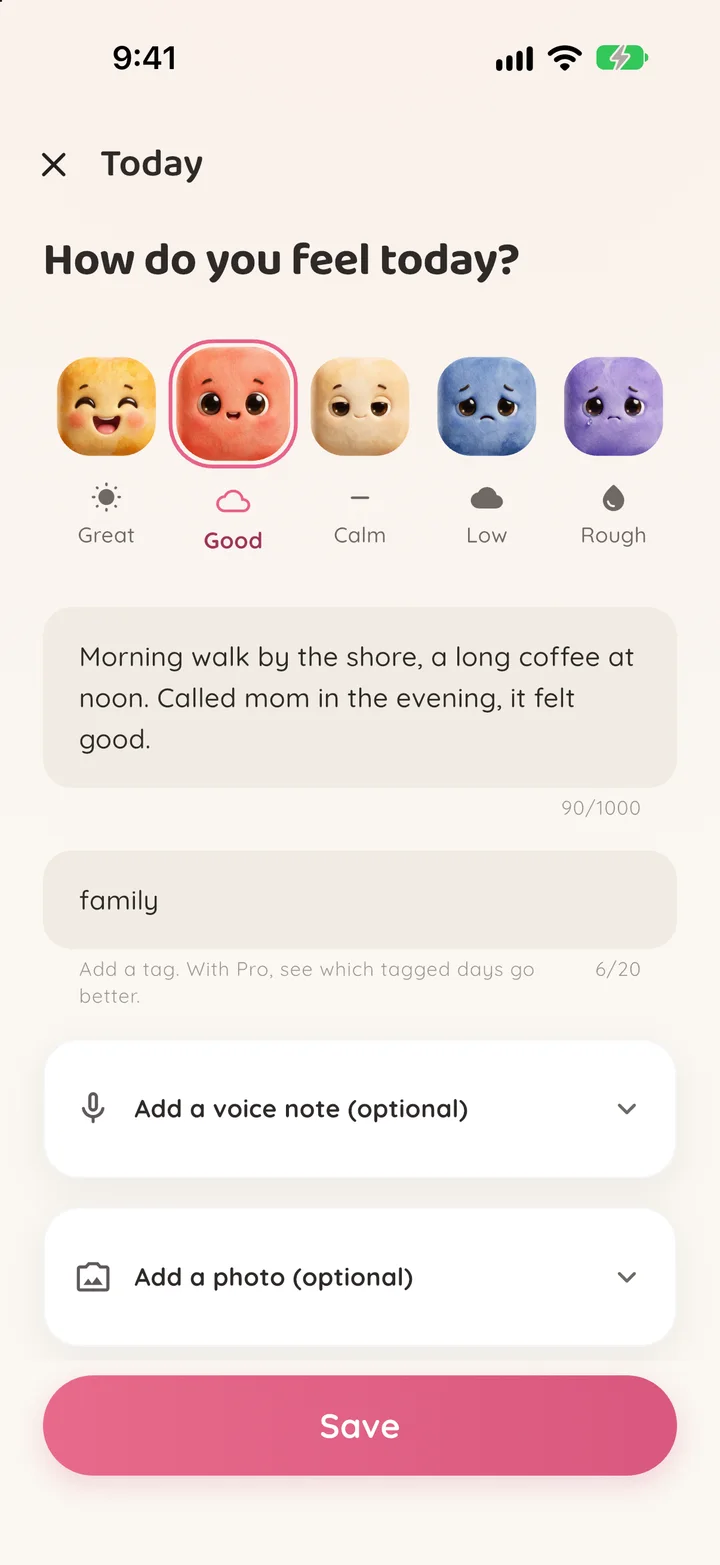
How are you today? Tap one of five moods. Adding a one-word note or a tag is up to you.
No paragraphs, no account. Pick a color, it takes five seconds. As weeks pass, your screen turns into a personal mosaic. Your period cycle lives in the same place, only on your phone.

No thinking, just pick today's color. Pixmood handles the rest.
1How are you today? Tap one of five moods. Adding a one-word note or a tag is up to you.
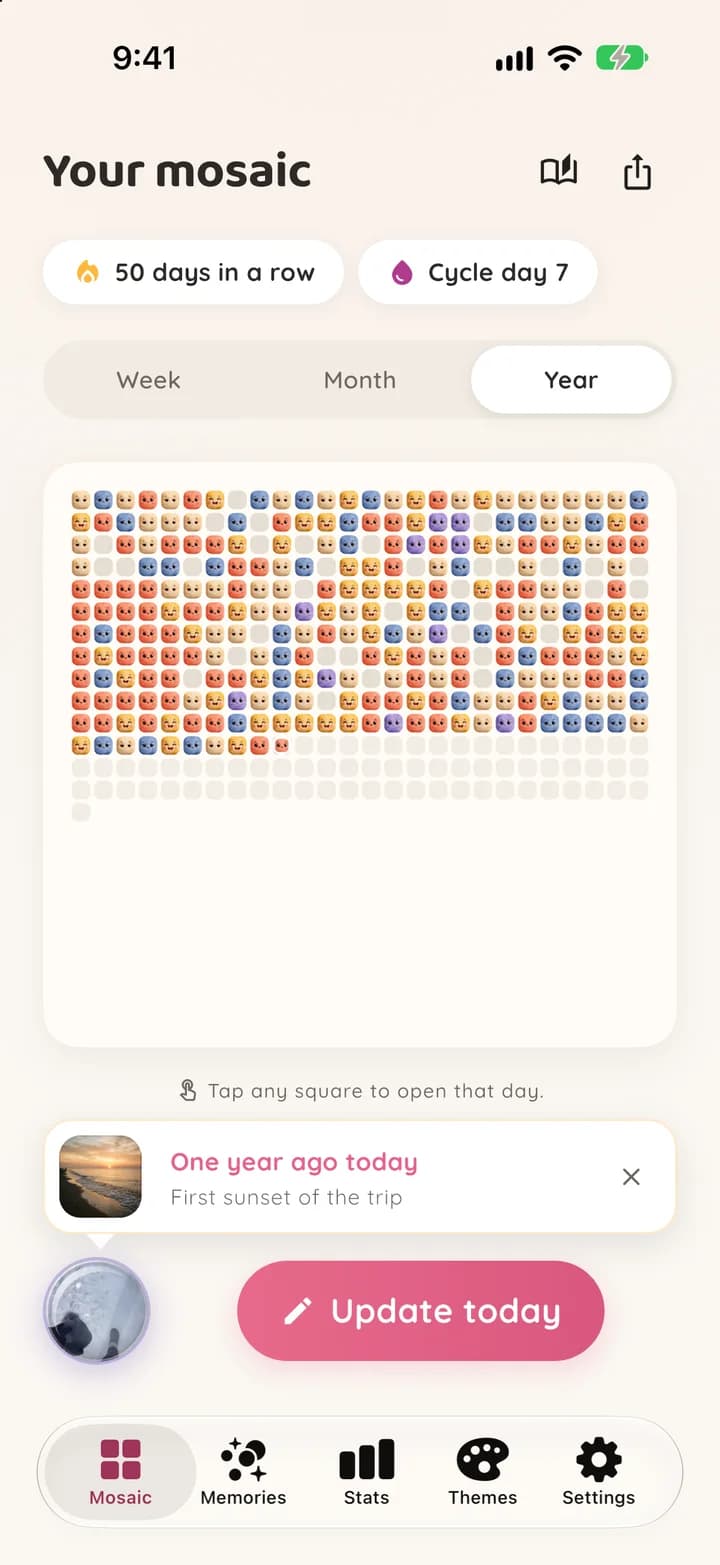
One square a day. Week by week, month by month, your screen becomes a mosaic. You start to see your flow.
 3
3By year's end you have a painting. With Pro, Wrapped gently shows your year back to you.
These are the app's real theme textures. Pick a theme, tap a square to change its mood, or shuffle the year. Pix and Watercolor are free, the other eight come with Pro.
Your mosaic starts with today's first square.
Download freeReal screens, not mockups. Warm colors, Pix's felt faces and a lot of quiet.
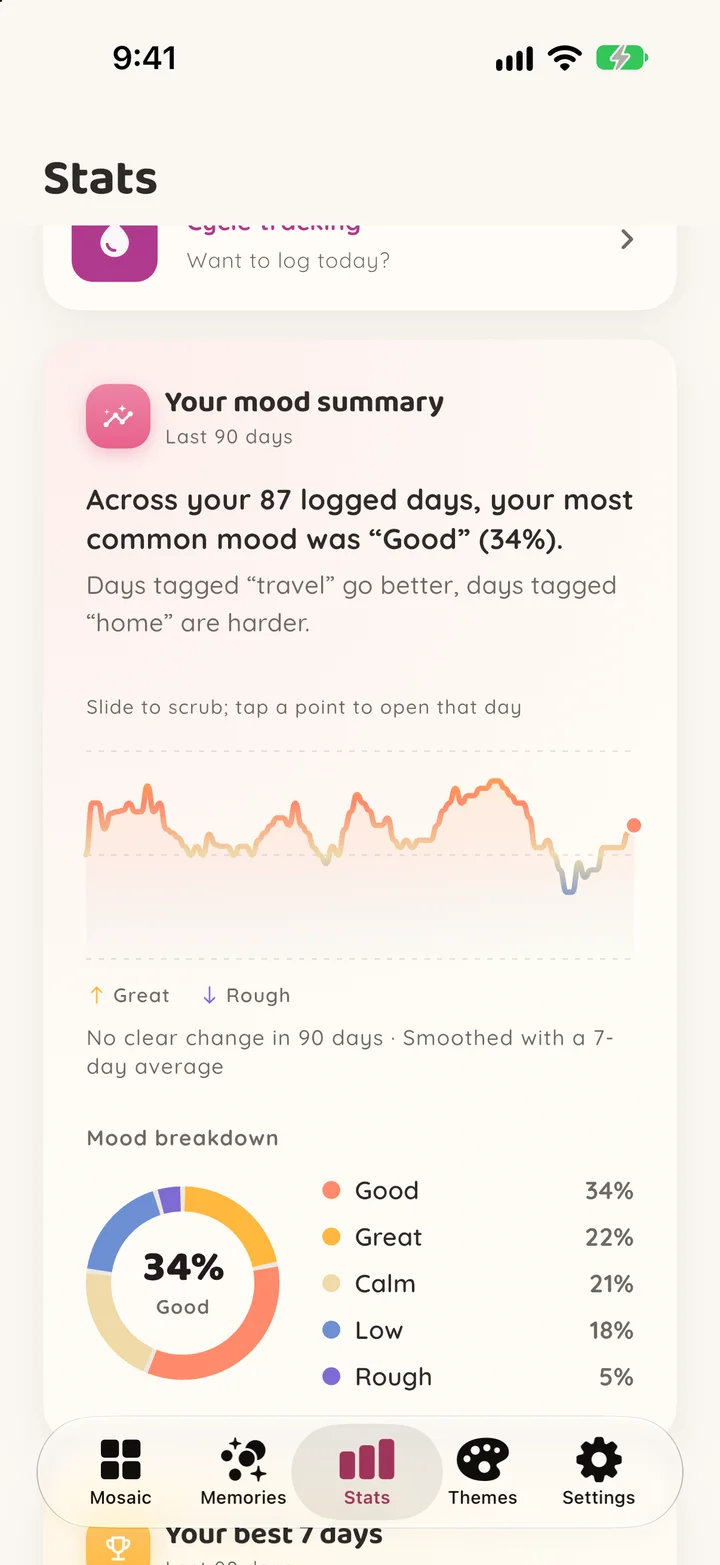
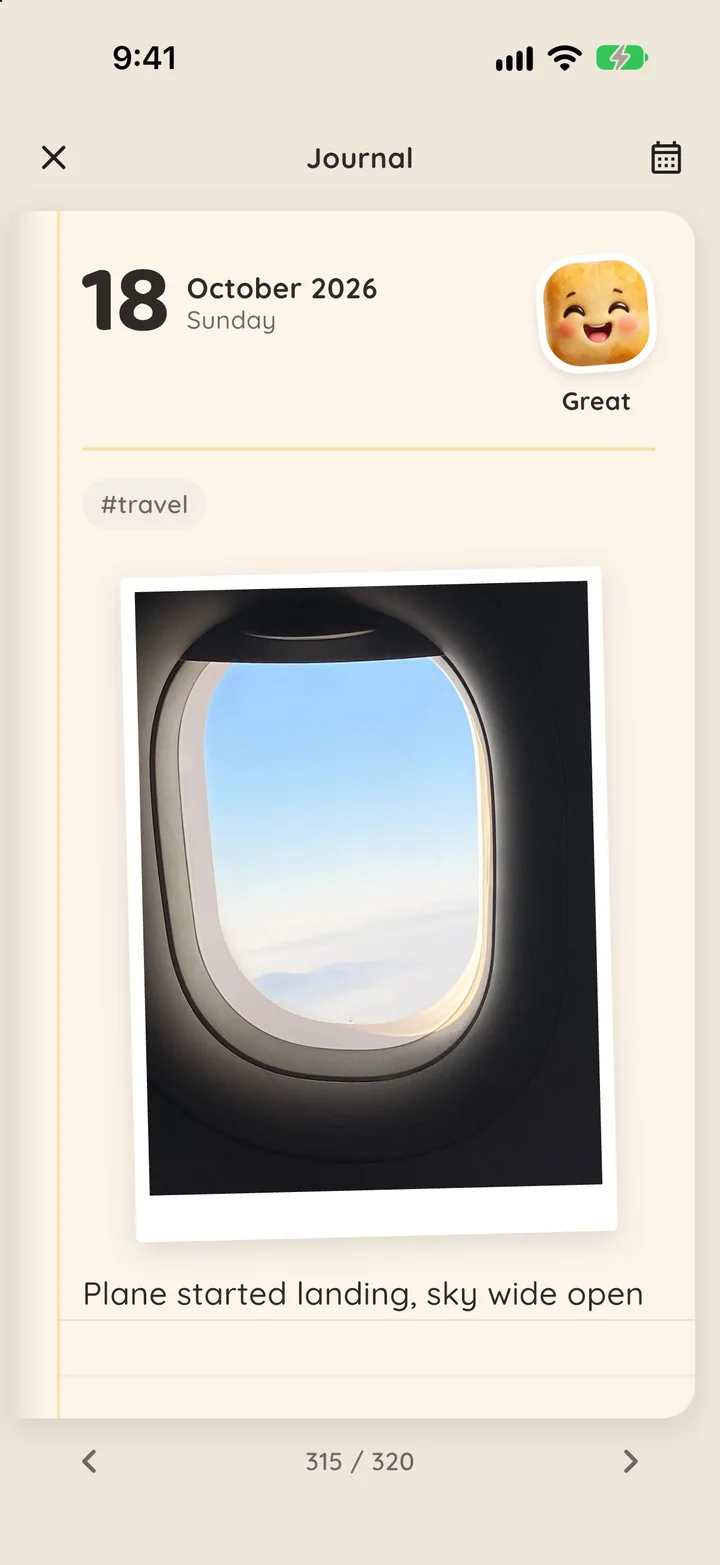
Five seconds a day is enough. Everything else is there when you want it, and none of it leaves your phone.
Pick one of five moods: Great, Good, Calm, Low or Rough. Add a note of up to 1,000 characters, a one-word tag, a photo or a voice note of up to two minutes if you like. Each mood also has its own icon, so the scale works without color too.
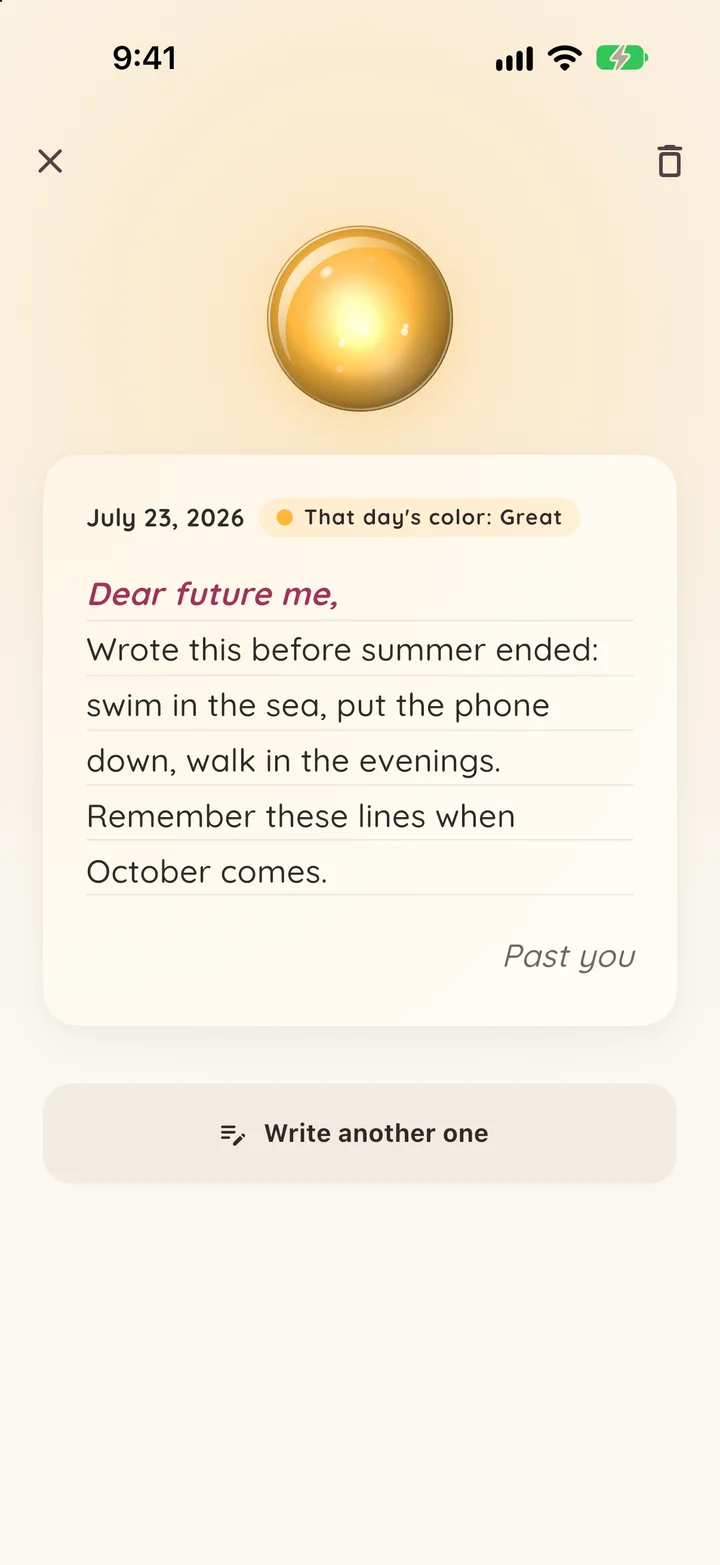
Write a letter to your future self and seal it. It opens in 1, 3 or 6 months, in a year or on a date you pick, and until then not even you can read it. Today's color goes in with it. One sealed capsule at a time is free, Pro has no limit.
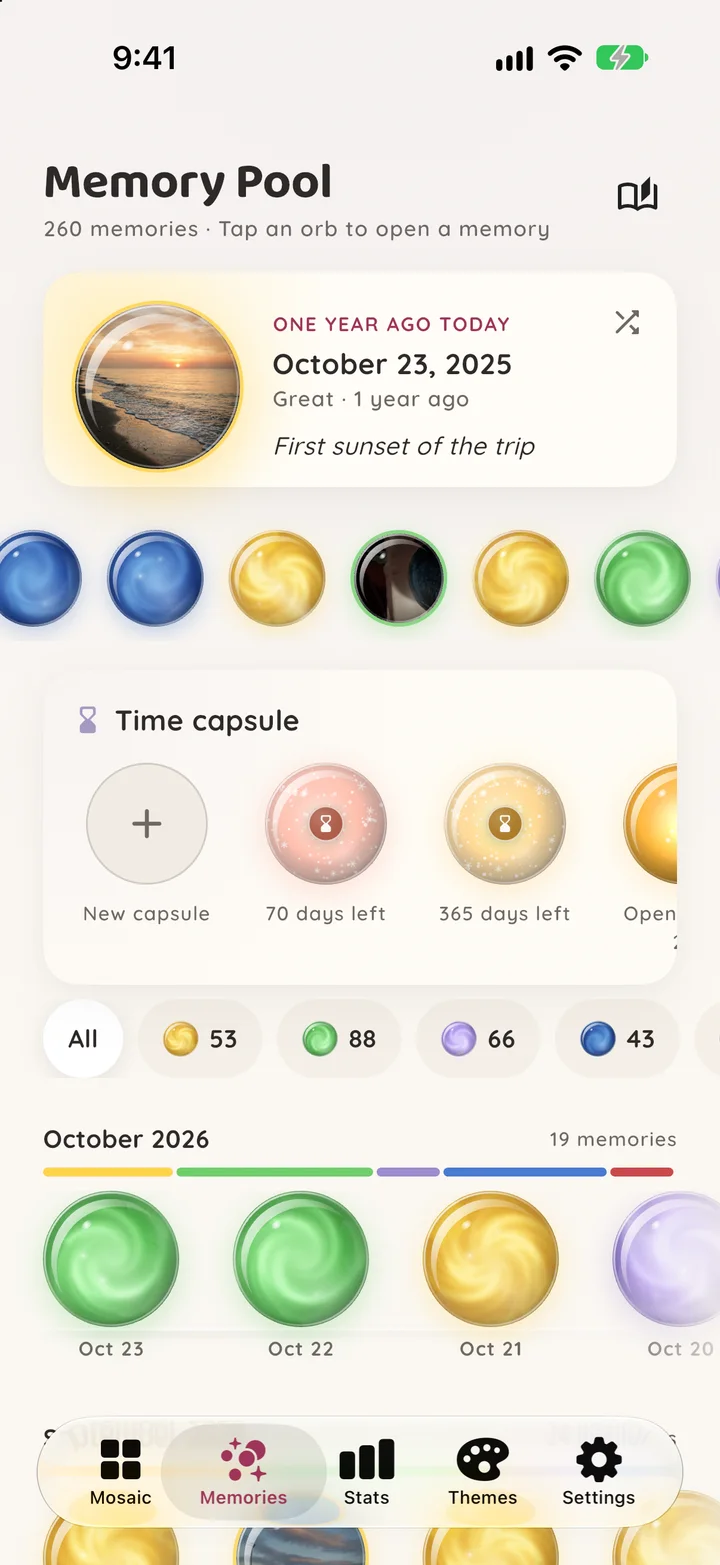
Days with a note, photo or voice note become glass orbs. Filter them by mood, browse them shelf by shelf, month by month, and let “one year ago today” bring a day back.
Every day gets its own page with its color, note, tag, photo and voice note. Flip between days or jump to any date.
After seven days you get a 30 day summary, your days of the week and your best weekday, free. Pro goes back up to a year and adds your mood trend, tags, weekdays vs weekends and month to month.
Log today straight from the home screen widget, without opening the app (iOS 17+ and Android). On iPhone you can also ask Siri to log today's mood or add a Control Center button; on Android, long-press the app icon.
Your mood and your cycle live in one app, only on your phone. Mark your period days; it predicts the next one and your cycle phase, and can remind you. Fully optional, one tap deletes it.
Start from a palette or from any theme, pick five mood colors and an empty-day color, then one of eight cell shapes. One custom theme is free, Pro has no limit.
Small celebrations at 7, 14, 21, 30, 100 and 365 days in a row. Miss a day and Pixmood just says start fresh today.
Up to three gentle nudges a day, at 9 a.m., 1 p.m. and 9 p.m., each time of day with its own messages. Check in and the rest of the day stays quiet.
Save your mosaic as a square (1:1) or story (9:16) card, or turn it into a phone wallpaper. Free cards carry a small Pixmood mark; Pro removes it.
Face ID, Touch ID, fingerprint or your device passcode. Back up to iCloud or Google, or pack everything into a single backup file.
On iPad and foldable phones Pixmood spreads into two panes, and the journal opens like a two-page notebook.
The free core covers everything. Pro is for those who want a deeper look at their year and their habits.
Monthly or yearly subscription, with a 3 day free trial on yearly. Theme packs you unlock stay yours even if you cancel. Soft paywall, skip it if you like. In-app purchase only.
Start free. Try Pro later, from inside the app, if you want.
Download freePrivacy isn't a feature bolted on, it's the foundation. This isn't a marketing line, it's an architectural fact.
“Your mood is your business. Pixmood sends it nowhere, it stays on your phone, period.”
This page keeps the same promise. Zero cookies, zero third-party trackers, zero ad code.
No account needed to try it: download, pick your first color.
Download freeEverything lives on your device, in a local SQLite database. There is no network layer for user data.
No registration, no email. Your journal works fully offline.
There are no ads in Pixmood, not even an ad SDK inside the app. Usage analytics are anonymous, with no device ID; your mood values are never logged.
Only biometric (lock), notification (reminder), microphone (voice notes), camera and photo (day photos, saving cards). No location, no contacts.
In one tap, pack your days, photos, voice notes, cycle data, custom themes and time capsules into a single backup file and restore it on any device. Your data is yours.
Backup leakage is off and COPPA is out of scope. Compliance was considered from the start.
Sourced, honest writing on digital journals, mood tracking and building the habit.
The one you will actually keep up every day, with data you know the location of. For most people that is a phone app that locks, needs no account and takes less than a minute a day. Pixmood takes exactly that route: you mark your day with a color in five seconds, add a note, photo or voice note if you want, and your journal never leaves your phone.
Year in Pixels is a tracking method where you color each day of the year by your mood, so the year ends as a grid of 365 squares. Pixmood does it as a digital mosaic: the week and month views are free, and the year view with all 365 days on one screen comes with Pixmood Pro.
Ten. Pix, the default with Pix's felt faces, and Watercolor are free. Pro adds Sunset, Memory Orbs, Skies, Snow Globe, Blossom, Ocean, Aurora and Meadow; Memory Orbs, Skies and Snow Globe are animated glass orbs. Each theme has its own cell shape, and in the theme editor you can build your own with one of eight shapes.
A letter to your future self. You write it today, choose when it opens (in 1, 3 or 6 months, in a year or on a date you pick) and seal it; until that day not even you can read it. On the day you get a notification and the letter opens with the color of the day you wrote it. One sealed capsule at a time is free, Pro removes the limit.
Yes. The home screen widget logs today with one tap (iOS 17 and later, and Android). On iPhone you can ask Siri or use Shortcuts to log today's mood; if the phone is locked, it asks you to unlock first. On iOS 18 you can also put a Pixmood button in Control Center, on the Lock Screen or on the Action button; it opens today's check-in. On Android, long-press the app icon for "Log today" and "Memories". All of these are free.
Yes. All data stays on your device in a local SQLite database. No account, sign-in or internet connection is needed. The app works fully offline.
Nowhere. Pixmood has no server or network layer for user data, so there is no address to send it to. You can pack your journal, photos and voice notes into a single backup file whenever you want.
Yes. The core of Pixmood is free: daily check-in with note, photo and voice note, week and month mosaic, Memory Pool, one time capsule, cycle tracking, widgets and share cards cost nothing. Pixmood Pro is an optional subscription that adds the year view, eight more themes, detailed stats going back up to a year, unlimited custom themes and capsules, and the yearly Wrapped recap. There are no ads in any version.
No. Pixmood has no sign-up, no email and no login. Download the app, pick your first color, and you are done. It does not even need an internet connection.
Two things. Time: instead of writing paragraphs you tap one color, so a check-in takes five seconds. Data: most mood apps ask you to create an account and keep your entries on their servers, while Pixmood has no server at all and your journal never leaves your phone. On top of that there are no ads in any version.
In Settings, create a backup file in one tap: your days, photos, voice notes, cycle data, custom themes and capsules are packed into a single file. Install Pixmood on the new phone, import that file, and you carry on where you left off. You can also keep iCloud backup on iPhone or Google backup on Android turned on.
Logging your mood daily makes patterns visible that you miss day to day: which days get heavy, how sleep or a busy week affects you, what the good stretches line up with. Pixmood shows this as a mosaic instead of a wall of text, so you can take in whole months at a glance. It is a tracking tool, not a diagnostic or treatment tool.
No. Pixmood shows no ads; there is not even an ad SDK inside the app. Usage analytics are anonymous: no device ID, no profile, and your mood values are never logged. Your journal never leaves your phone.
Pixmood is live on both stores: the App Store for iPhone and iPad, Google Play for Android phones and tablets. On iPad and foldable phones it uses a two-pane layout. There is no web or desktop version.
Turkish and English are fully supported, and the app follows your system language. The groundwork for more languages is in place.
There are monthly and yearly subscription options, and the yearly plan comes with a 3 day free trial. Theme packs you unlock stay yours even if you cancel. The price is localized to your currency, and you can see the current price in the store. Soft paywall: skip it if you like.
Yes. Cycle tracking is fully optional and never runs unless you turn it on. All cycle data stays on your device only, never reaches a server, is never shared, and you can delete it anytime. The fertility window is a rough estimate; it is not medical advice and not reliable for contraception.
It takes five seconds. By year's end you have a mosaic.